Orgs, Workspaces, Projects and Sharing
Written By revealai
Last updated 3 months ago
Once you get setup with an account and gain access, you’ll notice that RevealAI has a fairly standard permissions structure that includes Orgs, Workspaces, Projects and Users (Members & Guests)
Orgs, Workspaces, and Projects
At the very top of the hierarchy are Orgs. Your Org will always have one owner and potentially several members. Within an org you can have multiple Workspaces to organize your Projects. There is always a default workspace created with your org but you can create as many as you’d like. Projects are the container for an individual research project.
Access to these resources flows downwards along with a users Role. Those who have access at the org level also get access to any workspace (and thus any projects in those workspaces). Anyone with access to a single Workspace would get access to any projects in that workspace. In short you can share access at any level (org, workspace, or project) and that will allow access to that resource and any resources contained within it.
Users and Roles
Owner
Owners are the main point of contact for an org and have permissions to make any changes to the org including the transfer of ownership to another member. There is only one owner of each resource
Roles
When sharing access to an org, workspace or project you can select the users role from Editor, Viewer, or Limited Viewer depending on what you’d like them to be able to do. Remember that if you share an org or workspace it also applies to all the things contained within it.
Editors can create, view and edit projects
Viewers can view, but can’t edit or create, projects.
Limited Viewers can view only the results from a project and cannot edit. This is useful for providing access to an end client who might want to see some of the results or use the Chat With Your Data feature
Managing Users
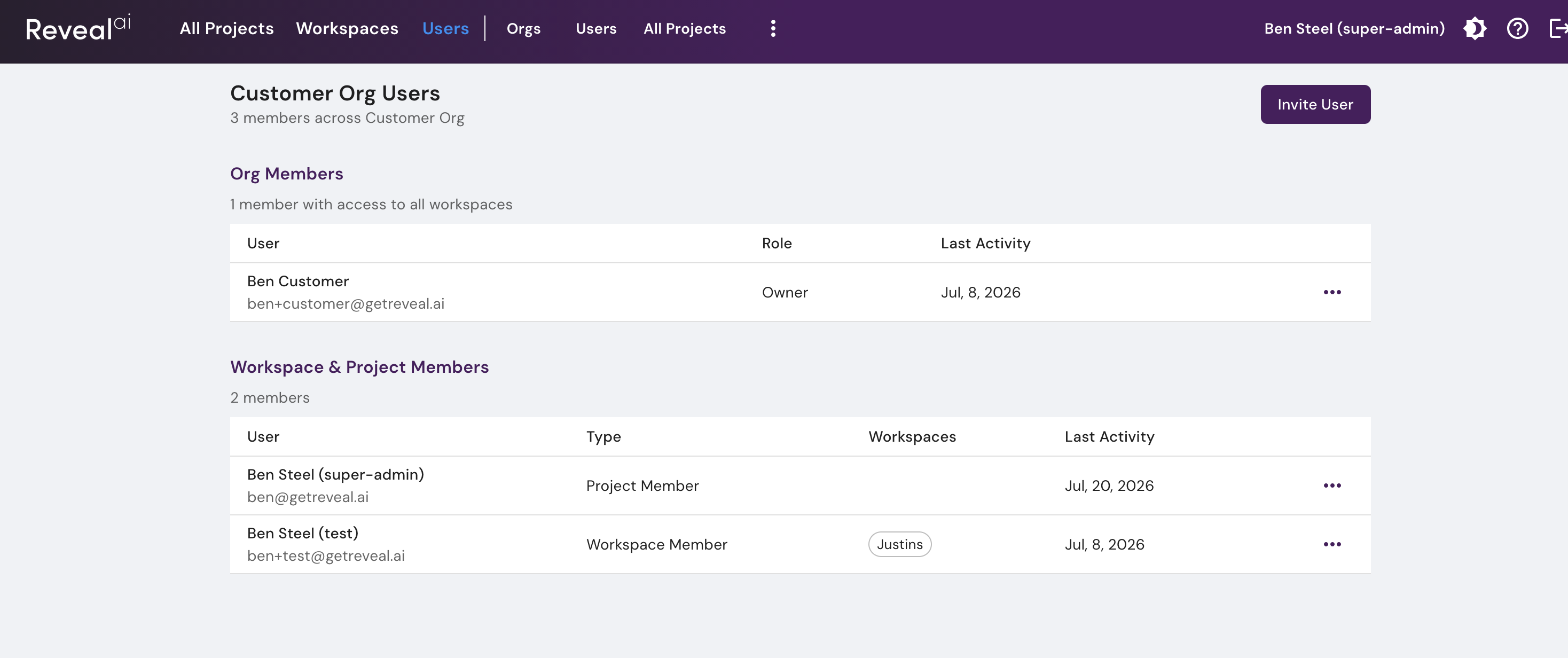
To manage users for the entire org you can click on the Users menu in the top nav bar. This will take you to the Org users management page which shows you all the users broken down by whether they have access at the Org level or at the Workspace/Project level.
Workspace/Project users are people who have a workspace/project shared directly with them but do not have a share at the org level
From this page you can edit user details and change their Org role. To change their role for specific workspaces/projects you must go to that workspace or project and then click on Sharing to edit user access to that resource
Was this helpful?
Still need help? Ask the team